HAMi Dynamic MIG on RTX PRO 6000: A Live Kubernetes Test
A hands-on test of topology-aware HAMi Dynamic MIG on RTX PRO 6000 Blackwell, with pinned setup commands, real allocations, mixed profiles, reclamation, and recovery.

Thanks to our hardware partner


This deep dive ran on an 8x NVIDIA RTX PRO 6000 Blackwell node from Utho Cloud. If you need GPU infrastructure to run workloads like these, take a look.
Explore UthoOn this page (29)
- Dynamic MIG in one sentence
- Why use Dynamic MIG instead of HAMi-Core?
- The RTX PRO 6000 profile menu
- Lab environment
- Pin the HAMi build before testing
- 1. Back up and inventory the existing installation
- 2. Build the exact source snapshot
- 3. Use current Dynamic MIG values
- 4. Render before installing
- 5. Perform the controlled lab handover
- What HAMi discovered through NVML
- A repeatable CUDA workload
- Test 1: 8,000 MiB becomes one 1g.24gb instance
- Test 2: four legal placements, then real saturation
- Test 3: mixed profiles share one physical GPU
- Test 4: reclaim only the pod's own instance
- Test 5: recover a valid allocation after plugin restart
- Test 6: the fifth pod spills to GPU 5
- Cleanup and final state
- Operational traps we hit
- Chart metadata is not the runtime version
- operatingmode is not migStrategy
- filterdevices excludes registration, not startup mutation
- A Helm upgrade may not restart the device plugin
- Scheduler events can use inherited language
- Reclamation is eventual, and UUIDs may be reused
- Legal placement still controls mixed profiles
- Homogeneous success is not a heterogeneous-node guarantee
- Conclusion
The first two posts in this series explored opposite ends of GPU sharing.
In the MIG deep dive, we carved Blackwell cards into hardware-isolated slices. MIG gives each instance dedicated memory, cache, and compute resources, but a static layout makes profile changes an operational task. In the HAMi vGPU post, we requested exact memory and compute fractions through software-enforced hami-core mode. That improves packing density, but it is not a hardware isolation boundary.
The natural third question is: can a Kubernetes pod request GPU memory, receive a real MIG instance, and let HAMi manage that instance from creation to cleanup?
We reran that experiment from scratch on August 11, 2026, on an eight-GPU RTX PRO 6000 Blackwell server. This post follows HAMi's topology-aware, per-pod Dynamic MIG implementation from installation through cleanup.
The results were straightforward:
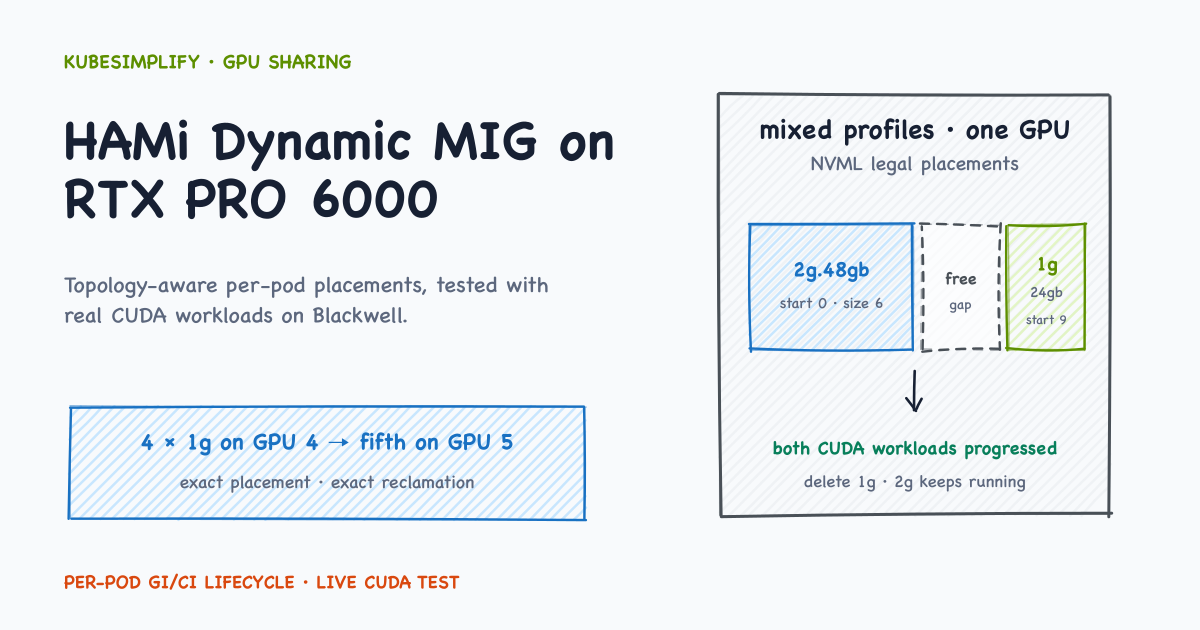
- Four 8,000 MiB requests became four
1g.24gbinstances on one GPU. - A fifth identical pod moved to a second GPU after we made that GPU available to HAMi.
- A
1g.24gbworkload and a2g.48gbworkload ran together on the same card. - Deleting the small workload reclaimed only its MIG instance; the neighboring CUDA workload continued.
- A valid active allocation survived a HAMi device-plugin restart with the same MIG UUID and continued CUDA progress.
Version and migration note: PR #2378 is merged, and this post tests the resulting per-pod implementation at commit
634bf2b32e68. At the time of this rerun, the latest tagged release wasv2.9.0, which predates that implementation, so reproducing the lab requires the pinned source build below. Once HAMi publishes a release containing PR #2378, prefer its matching official chart and image. ExistingknownMigGeometriesusers should follow the migration guide; the walkthrough below covers only the merged per-pod design.
Verified per-pod lifecycle
How one request becomes one hardware instance
This is the topology-aware flow verified in this lab: discover, reserve, create, and reclaim one legal placement for one pod.
Smallest fitting profile, legal free placement, exact cleanup. Deleting the 1g pod reclaimed only its GI/CI while the neighboring 2g CUDA workload continued.
Dynamic MIG in one sentence #
A pod asks for GPU memory. HAMi chooses the smallest allowed MIG profile that has enough NVML-reported memory and a legal free placement, then creates that exact GPU Instance (GI) and Compute Instance (CI) for the pod.
The workload request remains small:
metadata:
  annotations:
    nvidia.com/vgpu-mode: "mig"
spec:
  schedulerName: hami-scheduler
  containers:
    - resources:
        limits:
          nvidia.com/gpu: 1
          nvidia.com/gpumem: 8000
On a hami-core node, gpumem: 8000 is a software-enforced memory limit. On a Dynamic MIG node, it is a minimum memory requirement used to select a hardware profile. This GPU has no 8 GB profile, so the 8,000 MiB request receives 1g.24gb; the container sees the complete 24,192 MiB MIG instance.
Three details matter:
nvidia.com/vgpu-mode: "mig"explicitly selects the MIG path.- Profile selection is memory-driven.
nvidia.com/gpucoresdoes not select a MIG profile; the profile fixes the compute fraction in hardware. - NVIDIA's legal profile sizes and placements still apply. HAMi automates those rules; it does not remove them.
Why use Dynamic MIG instead of HAMi-Core? #
NVIDIA MIG divides a supported GPU into hardware-isolated instances. Each instance receives dedicated memory paths, cache, and compute resources. That is a stronger boundary than several workloads sharing one full GPU through software.
| HAMi-Core | Topology-aware Dynamic MIG | |
|---|---|---|
| Isolation | Software-enforced sharing | NVIDIA MIG hardware instance |
| Size choices | Fine-grained memory and core fractions | Fixed NVIDIA profiles |
| Pod request | gpu, gpumem, optional gpucores | gpu, gpumem, and MIG mode annotation |
| Lifecycle | Software allocation | Create and reclaim one GI/CI per pod |
| Best fit | High packing flexibility | Stronger workload isolation |
MIG can be part of a multi-tenant security design, but it does not make a platform secure or compliant by itself. Identity, admission, network, storage, runtime, and host controls still matter.
The RTX PRO 6000 profile menu #
NVIDIA's supported MIG profile table lists three profile sizes for the RTX PRO 6000 Blackwell Server Edition:
| Profile | Approximate memory | SM fraction | Maximum instances |
|---|---|---|---|
1g.24gb | 24 GB | 1/4 | 4 |
2g.48gb | 48 GB | 1/2 | 2 |
4g.96gb | 96 GB | Full GPU | 1 |
Profile rounding remains. An 8,000 MiB request receives the 24 GB profile, and the unused difference cannot be assigned to another pod inside that instance.
The implementation tested here uses a profile allowlist as policy:
nvidia:
  migProfileAllowlist:
    - models: ["RTX PRO 6000 Blackwell Server Edition"]
      profiles: ["1g.24gb", "2g.48gb", "4g.96gb"]
For every allowed profile, the HAMi device plugin running on the GPU node asks NVIDIA's Management Library (NVML) for memory, compute metadata, instance count, and legal placements. The scheduler then chooses the smallest profile that satisfies the request and fits without overlapping a live placement.
Lab environment #
| Component | Tested value |
|---|---|
| Server | Utho single-node GPU server |
| GPUs | 8 × NVIDIA RTX PRO 6000 Blackwell Server Edition |
| GPU memory | 97,887 MiB per physical GPU |
| NVIDIA driver | 610.43.02 |
| Kubernetes | v1.35.6 |
| OS | Ubuntu 24.04.4 LTS, kernel 6.8.0-100-generic |
| Container runtime | containerd 2.2.1 |
| HAMi source | 634bf2b32e68e07d3fbcbd6da1ee079392fc07c1 |
The run started with MIG mode enabled on all eight cards and no active CUDA processes:
nvidia-smi \
  --query-gpu=index,name,uuid,driver_version,memory.total,mig.mode.current \
  --format=csv

nvidia-smi \
  --query-compute-apps=gpu_uuid,pid,process_name,used_gpu_memory \
  --format=csv
The first command inventories the hardware and MIG mode. It returned all eight cards:
index, name, uuid, driver_version, memory.total [MiB], mig.mode.current
0, NVIDIA RTX PRO 6000 Blackwell Server Edition, GPU-8b89b58e-b427-108d-ac50-06138d78fe78, 610.43.02, 97887 MiB, Enabled
1, NVIDIA RTX PRO 6000 Blackwell Server Edition, GPU-03a041b7-8abf-360a-d1a2-dfd70188cd5f, 610.43.02, 97887 MiB, Enabled
2, NVIDIA RTX PRO 6000 Blackwell Server Edition, GPU-ba09367f-dd50-32ca-e988-7ff66bece885, 610.43.02, 97887 MiB, Enabled
3, NVIDIA RTX PRO 6000 Blackwell Server Edition, GPU-30512c46-708b-f374-5698-ee24be6cd626, 610.43.02, 97887 MiB, Enabled
4, NVIDIA RTX PRO 6000 Blackwell Server Edition, GPU-4c395b7a-a7e6-d90f-1ced-d96e8dd68288, 610.43.02, 97887 MiB, Enabled
5, NVIDIA RTX PRO 6000 Blackwell Server Edition, GPU-04dc48d7-7048-aef5-ad36-f5db716e7668, 610.43.02, 97887 MiB, Enabled
6, NVIDIA RTX PRO 6000 Blackwell Server Edition, GPU-f4f5db98-143f-0a8d-47ce-956fab39a736, 610.43.02, 97887 MiB, Enabled
7, NVIDIA RTX PRO 6000 Blackwell Server Edition, GPU-f4c61521-240a-da09-2787-e576034e197e, 610.43.02, 97887 MiB, Enabled
The second command checks for active compute processes before any lifecycle operation. Its real output contained only the header:
gpu_uuid, pid, process_name, used_gpu_memory [MiB]That means no CUDA compute process was active at that instant.
Host versus cluster commands: run host-level
nvidia-smi, Docker, andctrcommands on the GPU node. Runkubectland Helm from any machine whose kubeconfig targets the intended cluster. In this lab they all ran on the single RTX node.
Pin the HAMi build before testing #
This step exposed the easiest version trap in the entire lab. At commit 634bf2b, the checked-out chart and source contain topology-aware Dynamic MIG, but the chart metadata and default image tag still say 2.9.0. Rendering that chart without image overrides deploys the v2.9.0 binaries, not the code in the checkout.
Helm's chart or app version is therefore not proof of the running binary. We built the commit and used the same pinned image for the scheduler extender, device plugin, and monitor.
1. Back up and inventory the existing installation #
Before changing a running lab, capture both Helm's saved values and the live objects. They can differ:
export NODE=utho-gpu-rtxpro6000-8-62383
export LAB=/root/hami-dynamic-mig-rerun-2026-08-11

mkdir -p "$LAB"

helm get values hami -n hami-system --all -o yaml \
  > "$LAB/helm-values-before.yaml"
helm get manifest hami -n hami-system \
  > "$LAB/helm-manifest-before.yaml"
kubectl get configmaps -n hami-system -o yaml \
  > "$LAB/live-configmaps-before.yaml"
kubectl get node "$NODE" -o yaml \
  > "$LAB/node-before.yaml"
kubectl get pods -A --field-selector spec.nodeName="$NODE" -o wide
nvidia-smi -L > "$LAB/nvidia-smi-L-before.txt"
After taking the backups, we stopped every GPU workload and verified that the entire node was idle before continuing.
2. Build the exact source snapshot #
export HAMI_SHA=634bf2b32e68e07d3fbcbd6da1ee079392fc07c1
export HAMI_TAG=master-634bf2b32e68
export HAMI_IMAGE=localhost/hami-dynamic-mig:$HAMI_TAG

git clone --recurse-submodules \
  https://github.com/Project-HAMi/HAMi.git "$LAB/HAMi"
git -C "$LAB/HAMi" checkout --detach "$HAMI_SHA"
git -C "$LAB/HAMi" submodule update --init --recursive

make -C "$LAB/HAMi" docker \
  IMG_NAME=localhost/hami-dynamic-mig \
  IMG_TAG="$HAMI_TAG" \
  VERSION="$HAMI_TAG" \
  TARGET_PLATFORMS=linux/amd64

docker image inspect "$HAMI_IMAGE" \
  --format='ID={{.Id}} Architecture={{.Architecture}} SizeBytes={{.Size}}'
The final command verifies what was built. Our result was:
ID=sha256:0ddda56e333ff74e52d9908e00b85e7860cf4694fc09951aaa178e8c8e6dde76 Architecture=amd64 SizeBytes=411671341For a normal multi-node cluster, push that immutable tag to a registry every target node can reach. Our single-node lab instead imported the image into containerd:
docker save --output "$LAB/hami-$HAMI_TAG.tar" "$HAMI_IMAGE"
sudo ctr --namespace k8s.io images import "$LAB/hami-$HAMI_TAG.tar"
sudo ctr --namespace k8s.io images list | grep -F "$HAMI_IMAGE"
That local import is suitable only because the scheduler, plugin, and both tested GPUs lived on the same node. localhost/... is not an image that another node can pull. On multiple nodes, push the pinned build to a registry or import it on every target node.
3. Use current Dynamic MIG values #
The relevant parts of our hami-current-mig-values.yaml were:
global:
  imageTag: master-634bf2b32e68

scheduler:
  defaultSchedulerPolicy:
    nodeSchedulerPolicy: binpack
    gpuSchedulerPolicy: binpack
  extender:
    image:
      registry: localhost
      repository: hami-dynamic-mig
      tag: master-634bf2b32e68
      pullPolicy: Never

devicePlugin:
  image:
    registry: localhost
    repository: hami-dynamic-mig
    tag: master-634bf2b32e68
    pullPolicy: Never
  monitor:
    image:
      registry: localhost
      repository: hami-dynamic-mig
      tag: master-634bf2b32e68
      pullPolicy: Never

  # This is NVIDIA's static resource-exposure strategy.
  # Keep it separate from HAMi's per-node operating mode below.
  migStrategy: none

  nodeConfiguration:
    config: |
      {
        "nodeconfig": [
          {
            "name": "utho-gpu-rtxpro6000-8-62383",
            "operatingmode": "mig",
            "devicememoryscaling": 1,
            "devicecorescaling": 1,
            "devicesplitcount": 10,
            "preconfigureddevicememory": 0,
            "enablenumatopology": false,
            "migstrategy": "none",
            "filterdevices": {
              "uuid": [],
              "index": [0, 1, 2, 3, 5, 6, 7]
            },
            "enablegetpreferredallocation": false
          }
        ]
      }

# Empty means: use the device-config.yaml bundled in this pinned chart.
device-config:
  content: ""
Two similarly named settings do different jobs:
operatingmode: "mig"activates HAMi Dynamic MIG for this node.- Top-level
devicePlugin.migStrategy: nonetells the NVIDIA device-plugin path not to publish pre-created MIG resources separately. The workload still requests the parent resourcenvidia.com/gpuand HAMi creates the MIG instance dynamically.
Also, filterdevices.index is an exclusion list. The initial list excluded every card except GPU 4. It did not protect the excluded GPUs from all startup actions; we return to that safety boundary later.
4. Render before installing #
helm lint "$LAB/HAMi/charts/hami" \
  -f "$LAB/hami-current-mig-values.yaml"

helm template hami "$LAB/HAMi/charts/hami" \
  --namespace hami-system \
  --kube-version 1.35.6 \
  -f "$LAB/hami-current-mig-values.yaml" \
  > "$LAB/rendered-current-hami.yaml"

grep -n -A 25 'migProfileAllowlist' \
  "$LAB/rendered-current-hami.yaml"
grep -n -E 'image:|imagePullPolicy:' \
  "$LAB/rendered-current-hami.yaml"
The rendered manifest contained the RTX profile allowlist and the pinned image in all three HAMi containers. No projecthami/hami:v2.9.0 runtime image remained.
Avoid --reuse-values here. A saved per-component tag takes precedence over global.imageTag, so a stale custom plugin image can survive even when the global tag looks correct.
5. Perform the controlled lab handover #
Destructive lab step: we used a fresh reinstall only after every GPU pod and process on the single node was gone. Existing clusters should follow the linked migration guide instead of treating
helm uninstallas a general upgrade procedure.
helm uninstall hami -n hami-system --wait --timeout 5m

helm upgrade --install hami "$LAB/HAMi/charts/hami" \
  -n hami-system \
  --create-namespace \
  --reset-values \
  -f "$LAB/hami-current-mig-values.yaml" \
  --wait \
  --timeout 10m

kubectl get pods -n hami-system \
  -o custom-columns='POD:.metadata.name,CONTAINERS:.spec.containers[*].name,IMAGES:.spec.containers[*].image'
The live output confirmed that the scheduler extender, device plugin, and monitor all used:
localhost/hami-dynamic-mig:master-634bf2b32e68The monitor had one transient CDI StartError referring to a stale MIG UUID during the handover. Kubernetes retried it, and both plugin containers became ready. We checked the previous container state instead of hiding that transition.
What HAMi discovered through NVML #
The node registration annotation is the clearest view of what the plugin learned from the driver:
kubectl get node "$NODE" -o json |
jq '
  .metadata.annotations["hami.io/node-nvidia-register"]
  | fromjson
  | .[]
  | {id, index, type, mode, count, migProfiles}
'
The live discovery was:
| Profile | memoryMB | Core | sliceCount | Legal NVML placements (start, size) |
|---|---|---|---|---|
1g.24gb | 24,192 | 25 | 1 | (0,3), (3,3), (6,3), (9,3) |
2g.48gb | 48,512 | 50 | 2 | (0,6), (6,6) |
4g.96gb | 97,408 | 100 | 4 | (0,12) |
NVML reports each legal placement as start and size: start is the index of the first occupied memory slice, and size is the number of memory slices occupied. Together they describe the half-open interval [start, start + size). On this RTX PRO 6000, the reported placement range was [0,12); these values are not GiB and are specific to this GPU. Also, size is not the same thing as sliceCount: 1g.24gb has sliceCount: 1 but placement size: 3 here.
The registered count: 4 is a coarse maximum derived from the profiles. It does not mean every arbitrary combination of four profiles fits. The placement arrays and current occupancy determine real capacity.
A repeatable CUDA workload #
The test container repeatedly runs NVIDIA's vectorAdd sample and increments /tmp/gpu-progress after each successful run. That gives us a better health check than a sleeping container.
For readability, this Deployment combines the same workload template we used for the single-pod and packing tests. Save it as mig-small-pack.yaml and replace the node name if yours differs:
apiVersion: apps/v1
kind: Deployment
metadata:
  name: mig-small-pack
  namespace: hami-mig-retest
spec:
  replicas: 1
  selector:
    matchLabels:
      app: mig-small-pack
  template:
    metadata:
      labels:
        app: mig-small-pack
      annotations:
        nvidia.com/vgpu-mode: "mig"
        hami.io/gpu-scheduler-policy: "binpack"
    spec:
      schedulerName: hami-scheduler
      nodeSelector:
        kubernetes.io/hostname: utho-gpu-rtxpro6000-8-62383
      containers:
        - name: cuda
          image: nvcr.io/nvidia/k8s/cuda-sample:vectoradd-cuda12.5.0-ubuntu22.04
          imagePullPolicy: IfNotPresent
          command:
            - bash
            - -lc
            - |
              set -euo pipefail
              n=0
              echo 0 > /tmp/gpu-progress
              while true; do
                /cuda-samples/vectorAdd > /tmp/vectoradd.last 2>&1
                n=$((n + 1))
                echo "$n" > /tmp/gpu-progress.next
                mv /tmp/gpu-progress.next /tmp/gpu-progress
              done
          resources:
            limits:
              nvidia.com/gpu: 1
              nvidia.com/gpumem: 8000
Create the namespace, apply the workload, and wait for the pod to become ready:
kubectl create namespace hami-mig-retest
kubectl apply -f mig-small-pack.yaml
kubectl rollout status deployment/mig-small-pack \
  -n hami-mig-retest --timeout=180s

POD=$(kubectl get pods -n hami-mig-retest \
  -l app=mig-small-pack \
  -o jsonpath='{.items[0].metadata.name}')
Test 1: 8,000 MiB becomes one 1g.24gb instance #
HAMi writes its controller-owned identity to hami.io/vgpu-mig-allocations. Users should inspect this annotation, but never create or edit it:
kubectl get pod "$POD" -n hami-mig-retest -o json |
jq '.metadata.annotations["hami.io/vgpu-mig-allocations"] | fromjson'
Our first allocation was:
[
  {
    "containerIndex": 0,
    "deviceIndex": 0,
    "gpuUUID": "GPU-4c395b7a-a7e6-d90f-1ced-d96e8dd68288",
    "profile": "1g.24gb",
    "placement": {"start": 9, "size": 3},
    "migUUID": "MIG-a5fa6120-f6fa-51b6-9820-a42112640629",
    "gpuInstanceID": 6,
    "computeInstanceID": 0
  }
]
The host and container agreed about the device:
# On the GPU node
nvidia-smi -L

# Through the container's device view
kubectl exec -n hami-mig-retest "$POD" -- nvidia-smi -L
Both showed one 1g.24gb instance with UUID MIG-a5fa.... The placement happened to start at 9; the first allocation is not required to start at 0.
Finally, we verified that the CUDA loop was doing work:
before=$(kubectl exec -n hami-mig-retest "$POD" -- cat /tmp/gpu-progress)
sleep 3
after=$(kubectl exec -n hami-mig-retest "$POD" -- cat /tmp/gpu-progress)
printf 'before=%s after=%s\n' "$before" "$after"
test "$after" -gt "$before"
before=75 after=77Test 2: four legal placements, then real saturation #
Scale the same Deployment to four replicas:
kubectl scale deployment/mig-small-pack \
  -n hami-mig-retest --replicas=4
kubectl rollout status deployment/mig-small-pack \
  -n hami-mig-retest --timeout=180s
nvidia-smi -L
GPU 4 now contained four 1g.24gb instances. The allocation annotations used all four legal starts:
kubectl get pods -n hami-mig-retest -l app=mig-small-pack -o json |
jq -r '
  ["PARENT_GPU", "PROFILE", "START", "SIZE"],
  (
    .items[]
    | (.metadata.annotations["hami.io/vgpu-mig-allocations"] | fromjson | .[0]) as $a
    | [$a.gpuUUID, $a.profile, ($a.placement.start | tostring), ($a.placement.size | tostring)]
  )
  | @tsv
'
PARENT_GPU PROFILE START SIZE
GPU-4c395b7a-a7e6-d90f-1ced-d96e8dd68288 1g.24gb 0 3
GPU-4c395b7a-a7e6-d90f-1ced-d96e8dd68288 1g.24gb 3 3
GPU-4c395b7a-a7e6-d90f-1ced-d96e8dd68288 1g.24gb 6 3
GPU-4c395b7a-a7e6-d90f-1ced-d96e8dd68288 1g.24gb 9 3With only GPU 4 registered, scaling to five did not overcommit the card:
kubectl scale deployment/mig-small-pack \
  -n hami-mig-retest --replicas=5
kubectl get pods -n hami-mig-retest -o wide
Four pods remained Running; the fifth stayed Pending and unbound. Its event included:
0/1 nodes are available: 1 1/1 CardTimeSlicingExhausted.That inherited event label is misleading—the test did not use time slicing. Here it meant that no legal MIG placement remained on any registered GPU.
Scale back to four before the next test:
kubectl scale deployment/mig-small-pack \
  -n hami-mig-retest --replicas=4
Test 3: mixed profiles share one physical GPU #
The topology-aware implementation can place different profiles together whenever NVML reports legal, non-overlapping placements.
We cleared the small-pod Deployment, then created an 8,000 MiB pod and a 30,000 MiB pod. Both used the same CUDA loop and were pinned to GPU 4 with nvidia.com/use-gpuuuid so the test measured one physical card:
kubectl scale deployment/mig-small-pack \
  -n hami-mig-retest --replicas=0
kubectl wait -n hami-mig-retest \
  --for=delete pod -l app=mig-small-pack --timeout=180s
This Bash helper creates the same pod twice; only its name and memory request change:
export GPU4=GPU-4c395b7a-a7e6-d90f-1ced-d96e8dd68288

create_mig_pod() {
  local name="$1"
  local memory="$2"

  kubectl apply -f - <<EOF
apiVersion: v1
kind: Pod
metadata:
  name: ${name}
  namespace: hami-mig-retest
  annotations:
    nvidia.com/vgpu-mode: "mig"
    hami.io/gpu-scheduler-policy: "binpack"
    nvidia.com/use-gpuuuid: "${GPU4}"
spec:
  schedulerName: hami-scheduler
  nodeSelector:
    kubernetes.io/hostname: ${NODE}
  containers:
    - name: cuda
      image: nvcr.io/nvidia/k8s/cuda-sample:vectoradd-cuda12.5.0-ubuntu22.04
      imagePullPolicy: IfNotPresent
      command:
        - bash
        - -lc
        - |
          set -euo pipefail
          n=0
          echo 0 > /tmp/gpu-progress
          while true; do
            /cuda-samples/vectorAdd > /tmp/vectoradd.last 2>&1
            n=\$((n + 1))
            echo "\$n" > /tmp/gpu-progress.next
            mv /tmp/gpu-progress.next /tmp/gpu-progress
          done
      resources:
        limits:
          nvidia.com/gpu: 1
          nvidia.com/gpumem: ${memory}
EOF
}

create_mig_pod mixed-small 8000
create_mig_pod mixed-large 30000

kubectl wait -n hami-mig-retest --for=condition=Ready \
  pod/mixed-small pod/mixed-large --timeout=180s
We inspected the controller-owned allocation records with:
kubectl get pods mixed-small mixed-large -n hami-mig-retest -o json |
jq -r '
  ["POD", "PROFILE", "START", "SIZE", "MIG_UUID", "GI", "CI"],
  (
    .items
    | sort_by(.metadata.name)[]
    | . as $pod
    | ($pod.metadata.annotations["hami.io/vgpu-mig-allocations"] | fromjson | .[0]) as $a
    | [
        $pod.metadata.name,
        $a.profile,
        ($a.placement.start | tostring),
        ($a.placement.size | tostring),
        $a.migUUID,
        ($a.gpuInstanceID | tostring),
        ($a.computeInstanceID | tostring)
      ]
  )
  | @tsv
'
The live allocation table was:
POD          PROFILE    START  SIZE  MIG_UUID                                      GI  CI
mixed-large  2g.48gb    0      6     MIG-b23491d8-d784-58d9-bcfa-3c171ead22da      1   0
mixed-small  1g.24gb    9      3     MIG-a5fa6120-f6fa-51b6-9820-a42112640629      6   0
The intervals [0,6) and [9,12) do not overlap, so both profiles could coexist. nvidia-smi -L showed one 2g.48gb and one 1g.24gb instance under GPU 4.
Both CUDA loops advanced during the same three-second window:
small: 64 -> 67
large: 37 -> 39
PASS: both mixed-profile CUDA workloads progressed
Test 4: reclaim only the pod's own instance #
Before deleting the small pod, we recorded the large pod's progress. Then we deleted only mixed-small and polled the host until its 1g.24gb instance disappeared:
large_before=$(kubectl exec -n hami-mig-retest mixed-large -- \
  cat /tmp/gpu-progress)

kubectl delete pod mixed-small -n hami-mig-retest

# Reclamation is asynchronous; poll instead of assuming delete is instant.
watch -n 1 nvidia-smi -L
The host retained only:
MIG 2g.48gb Device 0: (UUID: MIG-b23491d8-d784-58d9-bcfa-3c171ead22da)The neighboring CUDA workload continued:
large: 61 -> 94
PASS: 2g workload survived 1g reclamation
We produced that check with:
large_after=$(kubectl exec -n hami-mig-retest mixed-large -- \
  cat /tmp/gpu-progress)
printf 'large: %s -> %s\n' "$large_before" "$large_after"
test "$large_after" -gt "$large_before" \
  && echo 'PASS: 2g workload survived 1g reclamation'
HAMi does not synchronously destroy the instance inside the kubectl delete call. Its annotation reconciler notices that the reservation is no longer active and removes the tracked CI and GI shortly afterward.
We also recreated a 1g.24gb instance at the freed placement. On this GPU and driver, it received the same MIG-a5fa... UUID. The UUID's observed disappearance proved reclamation; its later reappearance proved placement reuse. A MIG UUID is not a generation counter, so do not require a different UUID as proof of recreation.
Test 5: recover a valid allocation after plugin restart #
This is an advanced and disruptive controller test, not a normal workload step. We kept mixed-large active, recorded its progress and MIG UUID, then replaced the device-plugin pod:
OLD_DP_POD=$(kubectl get pods -n hami-system \
  -l app.kubernetes.io/component=hami-device-plugin \
  -o jsonpath='{.items[0].metadata.name}')

progress_before=$(kubectl exec -n hami-mig-retest mixed-large -- \
  cat /tmp/gpu-progress)

kubectl delete pod "$OLD_DP_POD" -n hami-system
kubectl rollout status daemonset/hami-device-plugin \
  -n hami-system --timeout=180s
The replacement plugin logged:
mig init: resolved startup layout inUseGPUs=[4] resetGPUs=[0,1,2,3,5,6,7]With a complete runtime allocation annotation, it classified GPU 4 as in use, left that card untouched during startup cleanup, verified the live profile and identity through NVML, and adopted the allocation.
The same 2g.48gb UUID remained, and the workload continued:
progress: 115 -> 187
PASS: MIG UUID and CUDA workload survived device-plugin restart
The verification checked both the device and the progress counter:
nvidia-smi -L | grep -F 'MIG-b23491d8-d784-58d9-bcfa-3c171ead22da'

progress_after=$(kubectl exec -n hami-mig-retest mixed-large -- \
  cat /tmp/gpu-progress)
printf 'progress: %s -> %s\n' "$progress_before" "$progress_after"
test "$progress_after" -gt "$progress_before"
This proves the tested happy path for a valid annotation. It is not a guarantee that incomplete or malformed state can always be adopted.
Node-wide safety warning:
filterdeviceslimits HAMi registration and scheduling, but at this commit it does not limit Dynamic MIG startup cleanup. The log shows that startup reconciled all eight physical GPUs, including filtered ones. Inventory and drain the entire node before the first install or a plugin restart; filtering a GPU is not a protection boundary.
Test 6: the fifth pod spills to GPU 5 #
After deleting the mixed-profile workload and confirming no MIG instances remained, we changed the exclusion list from:
kubectl delete pod mixed-large -n hami-mig-retest

until ! nvidia-smi -L | grep -q '^  MIG '; do
  sleep 2
done"index": [0, 1, 2, 3, 5, 6, 7]to:
"index": [0, 1, 2, 3, 6, 7]That made GPUs 4 and 5 available to HAMi. We applied the values and explicitly restarted the plugin only after confirming the whole node was idle:
helm upgrade hami "$LAB/HAMi/charts/hami" \
  -n hami-system \
  --reset-values \
  -f "$LAB/hami-current-mig-values.yaml" \
  --wait \
  --timeout 10m

# This configuration change did not trigger a plugin rollout by itself.
kubectl rollout restart daemonset/hami-device-plugin -n hami-system
kubectl rollout status daemonset/hami-device-plugin \
  -n hami-system --timeout=180s
This revealed a chart behavior worth knowing: Helm successfully updated the node-configuration ConfigMap, but the DaemonSet template did not checksum that ConfigMap. Registration stayed unchanged until we restarted the plugin.
The node then registered GPUs 4 and 5 in MIG mode. Scaling the small-pod Deployment to five produced this real distribution:
kubectl scale deployment/mig-small-pack \
  -n hami-mig-retest --replicas=5
kubectl rollout status deployment/mig-small-pack \
  -n hami-mig-retest --timeout=180s

kubectl get pods -n hami-mig-retest -l app=mig-small-pack -o json |
jq -r '
  ["POD", "PARENT_GPU", "PROFILE", "START", "MIG_UUID"],
  (
    .items
    | sort_by(.metadata.name)[]
    | . as $pod
    | ($pod.metadata.annotations["hami.io/vgpu-mig-allocations"] | fromjson | .[0]) as $a
    | [
        $pod.metadata.name,
        $a.gpuUUID,
        $a.profile,
        ($a.placement.start | tostring),
        $a.migUUID
      ]
  )
  | @tsv
'
POD PARENT_GPU PROFILE START
mig-small-pack-6f5b7bd7b-dwld2 GPU-4c395b7a-a7e6-d90f-1ced-d96e8dd68288 1g.24gb 3
mig-small-pack-6f5b7bd7b-g72fd GPU-4c395b7a-a7e6-d90f-1ced-d96e8dd68288 1g.24gb 0
mig-small-pack-6f5b7bd7b-jgql2 GPU-04dc48d7-7048-aef5-ad36-f5db716e7668 1g.24gb 9
mig-small-pack-6f5b7bd7b-rlxbn GPU-4c395b7a-a7e6-d90f-1ced-d96e8dd68288 1g.24gb 9
mig-small-pack-6f5b7bd7b-vjfv9 GPU-4c395b7a-a7e6-d90f-1ced-d96e8dd68288 1g.24gb 6GPU 4 held all four legal 1g.24gb placements. The fifth pod received a legal placement on GPU 5. Again, its first placement happened to start at 9; HAMi does not promise to allocate starts in numerical order.
Cleanup and final state #
We deleted the test namespace and waited for all per-pod MIG instances to be reclaimed:
kubectl delete namespace hami-mig-retest \
  --wait=true --timeout=180s

if nvidia-smi -L | grep -q '^  MIG '; then
  echo 'FAIL: MIG instances remain'
  nvidia-smi -L
else
  echo 'PASS: no MIG instances remain'
fi
Then we restored the original exclusion list, applied the values, and performed the same safe plugin restart. The final verification was:
printf 'Registered GPU indices: '
kubectl get node "$NODE" -o json |
jq -r '
  .metadata.annotations["hami.io/node-nvidia-register"]
  | fromjson
  | map(.index)
  | join(",")
'

if nvidia-smi -L | grep -q '^  MIG '; then
  echo 'MIG state: FAIL — instances remain'
else
  echo 'MIG state: PASS — no instances remain'
fi

kubectl get pods -n hami-system
Registered GPU indices: 4
MIG state: PASS — no instances remain
NAME READY STATUS RESTARTS
hami-device-plugin-6snlc 2/2 Running 0
hami-scheduler-74fbfcfbb5-qxftm 2/2 Running 0That left the lab in its intended baseline: only GPU 4 registered with HAMi, no test MIG instances, and both HAMi components healthy.
Operational traps we hit #
Chart metadata is not the runtime version #
At the tested commit, the chart still defaults to v2.9.0. Pin and inspect the live images for the scheduler extender, device plugin, and monitor. Do not publish latest, and do not rely on Helm's app-version label.
operatingmode is not migStrategy #
Use per-node operatingmode: "mig" for HAMi Dynamic MIG. Keep the Helm-level devicePlugin.migStrategy decision separate; changing only the similarly named field inside the JSON is not how this chart controls the NVIDIA plugin flag.
filterdevices excludes registration, not startup mutation #
The exclusion list controls which GPUs HAMi advertises for scheduling. It does not isolate the other physical cards from startup reconciliation. Treat first installation and plugin restart as node-wide maintenance at this commit.
A Helm upgrade may not restart the device plugin #
Changing devicePlugin.nodeConfiguration.config updated the ConfigMap but did not roll the DaemonSet in our test. Restart it deliberately, only after the node-wide safety check, then verify the registration annotation rather than trusting Helm's success message.
Scheduler events can use inherited language #
CardTimeSlicingExhausted described exhausted MIG placements in this run; it did not mean HAMi silently switched to time slicing. Confirm the allocation annotation and host MIG state before interpreting a generic reason string.
Reclamation is eventual, and UUIDs may be reused #
Poll the actual host state after pod deletion. The same placement can return the same MIG UUID, so disappearance between deletion and recreation is stronger lifecycle evidence than UUID inequality.
Legal placement still controls mixed profiles #
Dynamic does not mean arbitrary. The scheduler can combine profiles only when their NVML placement intervals do not overlap, and active instances cannot be destroyed just to satisfy a new request.
Homogeneous success is not a heterogeneous-node guarantee #
This node contained eight identical supported GPUs. Test mixed-model nodes separately; do not assume that filtering unsupported cards reproduces the same startup behavior.
Conclusion #
Topology-aware Dynamic MIG kept the Kubernetes API simple while making the hardware lifecycle precise. An 8,000 MiB request selected 1g.24gb; four legal placements filled GPU 4; a fifth pod used GPU 5; and 1g.24gb plus 2g.48gb occupied legal mixed placements on the same card.
The most useful result was not just allocation. HAMi reclaimed the small pod's exact GI/CI while its neighbor kept computing, and a valid allocation survived device-plugin restart and adoption. Those are the behaviors a dynamic controller needs to prove.
The caveats are equally important. Profile rounding and NVIDIA placement rules remain. Version alignment must be verified from live images. At this snapshot, plugin startup has a node-wide hardware scope even when only one GPU is registered, so controlled installation and restart procedures are mandatory.
HAMi is a CNCF Incubating project. Its source is at github.com/Project-HAMi/HAMi. Existing installations can use the pinned Dynamic MIG migration guide when moving to this per-pod implementation.
If you are joining the series here, read the static MIG deep dive and the HAMi software vGPU guide first.
Thanks to our hardware partner
This deep dive ran on an 8x NVIDIA RTX PRO 6000 Blackwell node from Utho Cloud. If you need GPU infrastructure to run workloads like these, take a look.
Explore UthoBuilding Hybrid K8s Platforms @trivago | Tech Author & Speaker (freeCodeCamp, SREDays) | vCluster Ambassador | RHCA & GCP DevOps Professional
Saiyam is working as Head of DevRel at vCluster Labs. He is the founder of Kubesimplify, focusing on simplifying cloud-native & AI infrastructure. He is KubeCon Co-chair and has worked on many facets of Kubernetes, including machine learning platforms, scaling, multi-cloud, & managed Kubernetes services. When not coding, Saiyam contributes to the community by writing blogs and organizing local meetups for Kubernetes and CNCF. He is also a CNCF TAG OpsRes Chair & can be reached on Twitter @saiyampathak.
Get new posts in your inbox.
Spotted a typo or want to improve this post? Edit on GitHub →